
If you’ve ever spent a Friday night hand-rotoing a strand of hair frame by frame, you already know why a tool like this exists. Roto and tracking cleanup is the unglamorous part of VFX work. It’s the stuff nobody puts in their reel, but it eats hours anyway.
Mocha Pro has been the go-to planar tracker for that kind of work for years, and the 2026 release just landed. The headline this time isn’t some flashy new feature you’ve never seen. It’s refinement. Boris FX took the AI masking and 3D camera solving people already liked and built a set of tools to clean up the messy edges, literally.
In this Mocha Pro 2026 review, I’ll walk through what the software actually does, break down every new feature in the 2026 update, talk about how the AI tools hold up once you point them at a real shot, and then get to the question everyone actually asks: is it worth the price? I’ll lean positive here because I think it earns it, but I’ll also tell you who should probably skip the upgrade.
What Is Mocha Pro, and Why Do VFX Artists Swear By It?
Before the new stuff, a quick grounding for anyone who landed here mid-research.
Planar Tracking in Plain English
Most trackers follow individual points. You pick a corner, a freckle, a bolt on a sign, and the software chases it across frames. That works until the point gets blurry, hides behind something, or leaves the shot. Then it falls apart.
Planar tracking works differently. Instead of points, it tracks flat surfaces, a wall, a phone screen, the side of a truck, by reading the whole plane’s movement and perspective. It holds up on shots with low detail, motion blur, reflections, and occlusions where point trackers usually give up. That’s the core reason Mocha became an industry standard. It’s the Emmy and Academy Award-winning planar tracker, and that pedigree isn’t marketing fluff. It’s on a lot of films and shows you’ve seen.
The Core Toolset
Mocha Pro is more than tracking. The full kit covers rotoscoping and masking, object removal, image stabilization, lens calibration, a 3D camera solver, and PowerMesh for tracking surfaces that warp and bend, like skin or clothing. There’s also stereo and 360/VR support if you work in those formats.
The practical version: you can track a moving sign, remove it, paint in a replacement, and have it stick through the whole shot without keyframing every frame. That’s the workflow people pay for.
Where It Lives
Mocha Pro runs as a plugin inside the apps you already use, or as a standalone application. Host support covers Adobe After Effects and Premiere Pro, Avid Media Composer, Foundry Nuke, Blackmagic Fusion, Autodesk Flame, and VEGAS Pro. So whatever your post-production workflow looks like, it probably drops in.
What’s New in Mocha Pro 2026?
Here’s the part you came for. The 2026 release is built around three refinement tools plus a pipeline update. Boris FX themselves described it as refinement rather than reinvention, and that’s a fair read.
Matte Refine ML, the New AI Edge Tool
This is the big one. Mocha Pro 2025 introduced AI masking with tools like Object Brush ML, Matte Assist ML, and Face ML. The catch was that AI masks struggled on the hard stuff, fine hair, soft edges, fast motion blur.
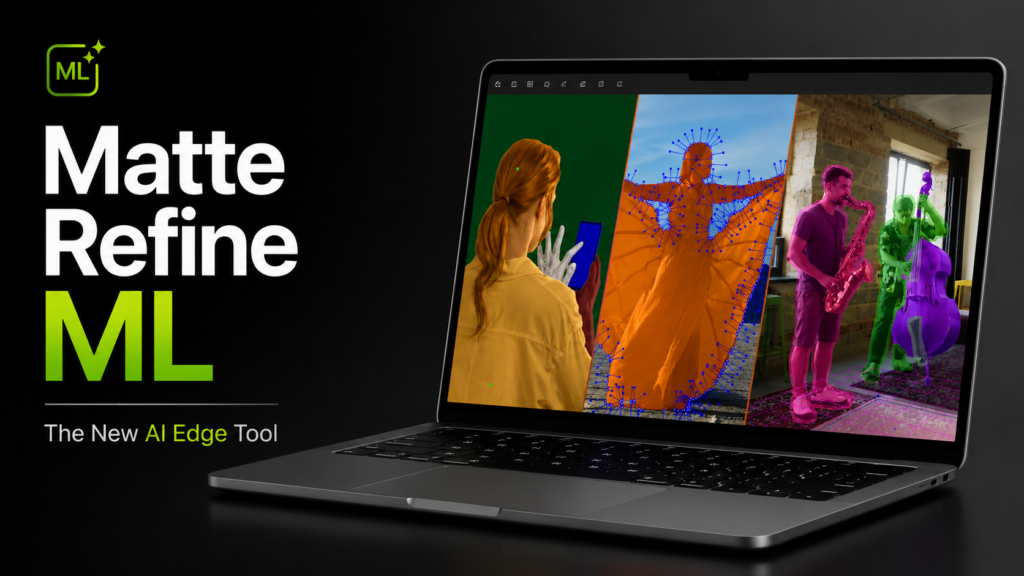
Matte Refine ML is a new AI model built specifically to fix those edges. You feed it a matte you already have, and it automatically refines the edges to catch detail that used to mean manual cleanup. Hair, blur, fast movement, the stuff that normally kills your evening.
There’s also a quietly useful addition here: you can group multiple layers and refine them into a single combined matte. That cuts render time and makes mattes easier to manage in render operations. If you’ve ever juggled a stack of layers trying to get one clean output, you’ll appreciate it. This is one of those AI tools that actually earns its place in a workflow rather than just being a checkbox on a feature list.
Refine Solve for Cleaner 3D Tracks
If you do 3D tracking, you know the pain of a solve that’s almost right. One bad patch of frames, a few erratic points, and historically your options were limited and annoying.
Refine Solve fixes that. You can now fix bad frames and smooth problem areas without redoing the entire solve. You delete the unstable or unwanted 3D features dragging your scene around, and the rest stays put. CG Channel pointed out the best part: this works even if the scene has been edited after the original solve, so you’re not punished for making changes downstream.
And if a shot needs heavier cleanup, you can export Refine Solve data straight into SynthEyes for advanced finishing. Nice to have that bridge instead of starting over in another app.
The Rebuilt Curve Editor
The Curve Editor is back, and it’s not just a port of the old one. It has a rebuilt core, a new interface, and tighter integration with the animation Dope Sheet.
What it does in practice: it lets you see potential problems in a track, roto, or camera solve as a curve, then drag the values to match reality. This is where it gets useful, on a frame where the track suddenly jumped because of an occlusion or something leaving the screen. You spot the spike, you smooth it, you move on.
It also lets you edit 3D camera curve data directly, and for the first time you can visualize the effect of AdjustTrack interactively. There’s a new Graphs panel for toggling between the Dope Sheet and Curve Editor. Small workflow thing, but it adds up over a long session.
VFX Reference Platform 2025 Support
This one’s invisible until it isn’t. The 2026 release conforms to VFX Reference Platform 2025 standards, which is the spec studios use to keep their software stack compatible across a pipeline.
Under the hood that means Qt 6.5.4 with PySide 6, Python 3.11, OpenEXR 3.4.5, Alembic 1.8.8, and FBX 2020.3.7. If you’re a solo artist, you’ll never think about this. If you’re in a studio, it’s the difference between Mocha playing nicely with everything else or causing weird conflicts. Boring, important, good that it’s there.
How Do the New AI Tools Hold Up in Real Work?
Feature lists are easy. The real question is what happens when you point these at an actual shot.
Where Matte Refine ML Actually Saves Time
The honest answer: the edges are where you feel it. A standard AI mask gets you a clean silhouette fast, but it tends to chew up fine detail. Hair turns into a blobby helmet. Motion blur gets a hard cutoff that screams “rotoscoped.”
Matte Refine ML is aimed right at that gap. In practice, the time you save isn’t on the initial mask, it’s on the cleanup you’d normally do afterward. The frames where you’d usually be nudging spline points around a flyaway strand are the frames it handles. That’s the part that used to burn the hours.
The Matte Assist ML and Refine ML One-Two Combo
The workflow Boris FX is pushing is auto-mask, then auto-refine. Matte Assist ML gets you the mask, Matte Refine ML cleans the edges. Run together, it’s a genuinely faster path through roto, compositing, and cleanup than doing either by hand.
For repetitive shots, a talking head you need to pull off a background, a person walking through a plate, this combo is where the 2026 release pays for itself in time. It fits neatly into a real post-production workflow rather than being a tech demo you fight with.
Where You’ll Still Reach for Manual Control
Now the fair part. AI roto is great until the shot gets weird. Heavy overlap, two subjects crossing, semi-transparent edges, low contrast between subject and background, that’s where any ML matte tool, including this one, still needs a human babysitting it.
The Curve Editor actually helps here, because when the automated pass drifts, you’ve got a clean way to see and fix the drift instead of scrubbing frame by frame hunting for the problem. So the realistic expectation isn’t “AI does it all.” It’s “AI does the boring 80%, and you’ve got better tools for the tricky 20%.” That’s still a big win, just not a magic button.
Mocha Pro 2026 Pricing: Subscription vs Perpetual
Let’s talk money, because this is not cheap software and you deserve the real numbers.
What It Costs
Subscription pricing starts at $48 per month or $325 per year. If you’d rather own it outright, the perpetual license runs around $1,095 for the standalone plus multi-host plugin bundle with a year of upgrades and support.
The math is straightforward. If you only need it for a few months of project work, the monthly plan makes sense. If you use it year-round, the annual plan is the obvious pick. The perpetual license is for people who hate subscriptions and plan to keep the tool for years.
Who Gets the Update Free
Worth knowing: if you’re on an active Mocha Pro or Boris FX Suite subscription, or you have an upgrade and support plan, the 2026 release comes as a free update. So a chunk of existing users get all of this at no extra cost. If that’s you, there’s no decision to make. Just update.
How It Compares to the Boris FX Suite
If you find yourself wanting more than tracking, Mocha is also part of the wider Boris FX Suite alongside Sapphire and Continuum. For some people the Suite is better value than buying tools piecemeal, especially if you also want effects and transitions. It’s the same logic we use in our other software comparison breakdowns: the standalone tool is the right call until you need two or three things, then the bundle starts winning. This clearly isn’t one of our budget value picks, but value isn’t only about the sticker price. It’s about what the tool saves you.
Is Mocha Pro 2026 Worth It?
So, the verdict. Here’s how I’d think about it.
Who It’s a No-Brainer For
If roto and tracking are part of how you make money, this is an easy yes. Compositors, VFX artists, motion designers doing cleanup and object removal, anyone whose week includes pulling mattes off hair or stabilizing shaky plates. The 2026 refinement tools target the exact tasks that waste your time, and time is the whole game in post.
If you’re already paying for it, it’s free. Update and move on.
Who Can Probably Skip the Upgrade
Here’s where I’ll be straight with you. If you’re a casual editor who occasionally needs to blur a license plate, you don’t need this, the basic tools in your editor will do. If you’re on Mocha Pro 2025 and you don’t work with hair roto, fast motion blur, or 3D solves, the 2026 update is genuinely nice but not urgent. There’s no shame in waiting a cycle.
And if you’ve never tracked anything in your life, start with the free trial before you commit. There’s a learning curve. Planar tracking thinks differently than point tracking, and it takes a few projects to click.
The Verdict
Mocha Pro 2026 is a confident, focused update. It doesn’t reinvent anything, and it doesn’t need to. It took the AI masking and 3D solving people already liked and made them usable on the hard shots that used to break them. For the people who live in this software, that’s exactly the kind of update you want, less spectacle, more hours back in your day.
Final Thoughts
A few takeaways if you’re skimming. First, the 2026 release is about refinement, Matte Refine ML for cleaner edges, Refine Solve for fixing 3D tracks without starting over, and a rebuilt Curve Editor for spotting and smoothing problems. Second, the AI handles the boring majority of roto well, but you’ll still want manual control for the genuinely tricky shots, and the new tools make that manual work faster too. Third, the pricing is fair for what it saves, and a lot of existing users get the update for free.
If you’re even a little curious whether it fits your workflow, don’t take my word for it. Start the free trial and point it at a shot you’ve been dreading. That’s the fastest way to find out if it’s worth the price for you.


2 Responses
Bro is the best
Less gooo, thanks for the info