
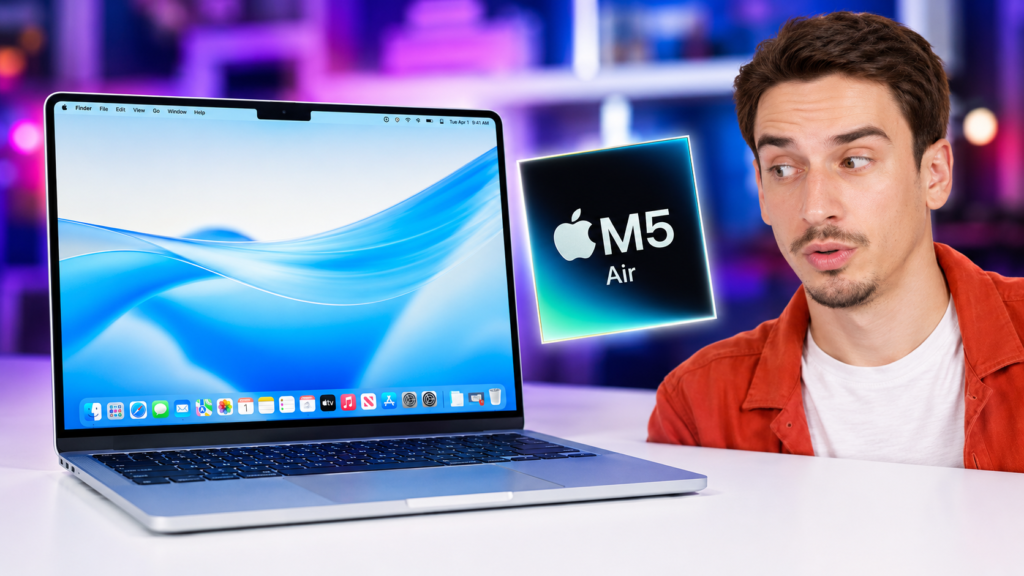
The MacBook Air M5 is a great laptop. But it is not a major upgrade for recent Air owners.
Apple kept the same thin, fanless design. It also kept the same screen, keyboard, trackpad, and port layout.
Most changes sit inside the laptop. You get the M5 chip, Wi-Fi 7, Bluetooth 6, and a 512GB base SSD.
Those upgrades matter most for older laptop owners. Meanwhile, M4 users will notice little change during normal work.
This MacBook Air M5 review covers daily use, speed, heat, battery life, and long-term value.
MacBook Air M5 Review: The Quick Verdict
The MacBook Air M5 is easy to recommend as a new laptop. Still, it is hard to justify as an M4 upgrade.
It feels fast, stays silent, and lasts through a normal workday. The base model also includes a useful 512GB SSD.
But the 60Hz screen still feels dated. The two-port layout also makes a hub useful for many buyers.
Buy the MacBook Air M5 if:
- You are moving from an Intel Mac or older Windows laptop.
- You want strong speed without fan noise.
- You edit photos, code, or handle large work projects.
- You want 512GB of storage in the base model.
- You plan to test smaller local AI models.
- You need more power and RAM than MacBook Neo offers.
Skip it if:
- You already own a MacBook Air M4.
- You need a 120Hz screen.
- You run long renders or exports every day.
- You need HDMI, SD card, or more built-in ports.
- You find an M4 Air at a much lower price.
MacBook Air M5 Specifications at a Glance
| Feature | 13-inch MacBook Air M5 |
|---|---|
| Processor | Apple M5 with 10-core CPU |
| Graphics | 8-core GPU, configurable to 10-core GPU |
| Memory | 16GB unified memory, configurable to 24GB or 32GB |
| Storage | 512GB SSD, configurable up to 4TB |
| Display | 13.6-inch Liquid Retina, 2560 by 1664 |
| Brightness | 500 nits |
| Camera | 12MP Center Stage camera |
| Wireless | Wi-Fi 7 and Bluetooth 6 |
| Ports | Two Thunderbolt 4 ports, MagSafe, headphone jack |
| External displays | Support for up to two external displays |
| Battery claim | Up to 18 hours |
| Cooling | Fanless |
The 512GB base SSD is the most useful change. It gives buyers more room without a quick storage upgrade.
Design and Build: Almost Nothing Changed, and That Is Mostly Fine
The MacBook Air M5 keeps Apple’s current Air design. It remains thin, light, solid, and easy to carry.
The 13-inch model weighs 2.7 pounds. Therefore, it works well for travel, classes, and small desks.
The body also feels firm during normal use. The lid opens smoothly, while the keyboard deck stays stable.
But the same design gives M4 owners little reason to upgrade. The laptop feels almost the same outside.
Sky Blue Looks Better in Person
Sky Blue is more subtle than its name suggests. In dim light, it can look close to silver.
Under brighter light, the blue tone becomes clearer. Even then, the finish still looks clean and professional.
Midnight remains the darker choice. But it shows fingerprints and skin oils more easily.
Portability Is Still One of the Main Reasons to Buy It
The 13-inch model suits travel and daily commutes. Meanwhile, the 15-inch model gives you more workspace.
Both models feel much the same. Therefore, screen size and weight should guide your choice.
Choose 13 inches for travel. Choose 15 inches for split-screen work and larger timelines.
MacBook Air M5 Display: Excellent Color, Disappointing Motion
The 13.6-inch Liquid Retina display looks sharp and vivid. It supports P3 color, True Tone, and 500-nit brightness.
Text stays crisp during long work sessions. Photos also look vivid without getting too bright or harsh.
The screen works well for writing, coding, browsing, photo edits, and streaming. But motion remains its main weakness.
The 60Hz Refresh Rate Is Getting Harder to Excuse
The MacBook Air M5 still uses a 60Hz panel. Therefore, scrolling looks less smooth than 90Hz screens.
The gap looks clearer beside a MacBook Pro. It also stands out after using a 120Hz phone.
Most users will adjust within a few days. Still, a high-end laptop should offer smoother motion in 2026.
Glossy Glass Still Means Reflections
The glossy screen adds strong contrast and clear color. But it also reflects lights, windows, and bright rooms.
Indoor brightness often handles that glare well. Outdoor use becomes much harder near direct sunlight.
The Air lacks Apple’s nano-texture option. Therefore, bright-room users should think about their main workspace.
Keyboard, Trackpad, Webcam, and Speakers
The keyboard remains comfortable for long typing sessions. Its keys feel short, firm, and even.
The large Force Touch trackpad is still excellent. It feels precise across gestures, clicks, and fine cursor work.
Touch ID unlocks the Mac quickly. It also speeds up passwords, payments, and secure settings.
The 12MP Center Stage camera keeps you framed during calls. Desk View can also show items below the laptop.
Speaker quality remains strong for such a thin device. Calls, videos, music, and movies sound clear and wide.
MacBook Air M5 Performance: Faster Where It Matters, Invisible Where It Does Not
The MacBook Air M5 is very fast for a fanless laptop. But basic work already felt instant on the M4.
The M5 uses a 10-core CPU. Buyers can choose either an 8-core or 10-core GPU.
Apple also raised memory bandwidth from 120GB/s to 153GB/s. Therefore, heavy work gets more room to breathe.
Everyday Work Does Not Need This Much Power
Email, docs, web pages, and video calls feel quick. Yet the M4 Air handles those jobs almost as well.
Most users will not notice a major speed jump. You see this most during short and light tasks.
Still, the M5 handles busy workdays with ease. Many tabs and several apps should not create clear delays.
The base 16GB setup suits most buyers. But heavy photo or video work may need 24GB.
Creative Work Is Where the M5 Makes More Sense
The extra power helps during photo exports, 4K editing, code builds, and graphics work.
Apple reports larger gains in some AI and graphics tasks. But those gains depend on the app.
Short projects run quickly. But long workloads expose the limits of the fanless cooling system.
The Air remains a strong creative laptop. Still, it cannot replace every MacBook Pro.
Local AI Is a Real Reason to Care About M5
The M5 adds Neural Accelerators inside its GPU cores. It also includes a 16-core Neural Engine.
These parts can help with local models, speech tools, image tools, and AI features.
But RAM size matters more than many buyers expect. Local model files can also use lots of storage.
The 16GB model suits smaller models and light tests. Meanwhile, 24GB or 32GB offers more useful headroom.
Buy more RAM when local AI is a key goal. You cannot upgrade RAM after purchase.
Thermals and Noise: Silence Has a Cost
The MacBook Air M5 has no fan. Therefore, it stays silent during normal work.
Writing, browsing, calls, and light editing rarely create major heat. The laptop feels calm during those tasks.
But long exports and repeated heavy jobs warm the chassis. macOS may then lower speed to manage heat.
This is normal for a fanless laptop. Still, it matters during long and heavy workloads.
Choose the Air for quiet bursts of speed. Choose the Pro when speed must stay high.
MacBook Air M5 Battery Life: A Real Full-Day Laptop
Apple rates the M5 Air for up to 18 hours of video playback. It rates wireless browsing at 15 hours.
Real battery life changes with brightness, apps, calls, and workload. But the Air can cover a normal workday.
Writing, browsing, and messaging use less power. In contrast, gaming, video work, and local AI drain it faster.
Battery life remains one of the Air’s best strengths. It also cuts the need to carry a charger.
Ports and Connectivity: Better Wireless, Same Dongle Problem
The MacBook Air M5 includes two Thunderbolt 4 ports. It also includes MagSafe and a headphone jack.
Apple added Wi-Fi 7 and Bluetooth 6 through its N1 chip. These upgrades need compatible gear.
The Air can drive up to two external displays. Therefore, it works well as a desk Mac.
But the port choice remains small. Many users will still need a hub or dock.
Photographers need an SD card reader. Presenters may also need an HDMI adapter.
MacBook Air M5 vs M4: What Actually Changed?
| Area | MacBook Air M5 | MacBook Air M4 | Does It Matter? |
|---|---|---|---|
| CPU | Newer M5 chip | M4 chip | Mostly during heavy work |
| GPU | Neural Accelerators and stronger graphics | Older GPU design | Useful for AI and graphics |
| Memory bandwidth | 153GB/s | 120GB/s | Helps heavy workloads |
| Base storage | 512GB | 256GB | A useful daily upgrade |
| Maximum storage | 4TB | 2TB | Helpful for large projects |
| Wireless | Wi-Fi 7 and Bluetooth 6 | Older wireless standards | Useful with newer hardware |
| Design | Almost unchanged | Same Air design | No visual upgrade |
| Display | 60Hz Liquid Retina | 60Hz Liquid Retina | No improvement |
| Cooling | Fanless | Fanless | Same limit under long loads |
For most M4 owners, the right choice is simple. Keep the M4.
The M5 adds faster storage, newer wireless support, and stronger AI tools. But normal use feels very close.
Upgrade only when one M5 feature solves a real problem. Otherwise, your M4 remains a great laptop.
MacBook Air M5 vs MacBook Neo
MacBook Neo gives casual users a cheaper entry into macOS. But it uses the smaller A18 Pro chip.
Neo also includes 8GB of unified memory. Its storage choices stop at 512GB.
Choose MacBook Neo for browsing, docs, email, streaming, and simple school work.
Choose the MacBook Air M5 for heavy apps, coding, creative work, and local AI.
The Air also offers P3 color and more RAM choices. Therefore, it gives you more room for future work.
Neo is the value choice for basic use. Meanwhile, the Air is the safer long-term work laptop.
For cheaper devices, visit TheByteLab’s best budget technology picks.
Which MacBook Air M5 Configuration Should You Buy?
Best Configuration for Most People
16GB RAM and 512GB storage
This setup suits students, writers, office users, developers, and photographers. It also handles moderate photo and video work.
The base storage is finally useful. Therefore, many buyers can avoid Apple’s costly storage upgrades.
Best Configuration for Creative Work
24GB RAM and 512GB or 1TB storage
Choose this setup for larger photo libraries and frequent 4K editing. It also suits bigger coding projects.
The extra RAM helps when many apps stay open. Meanwhile, more storage helps with media, cache files, and backups.
Best Configuration for Local AI
24GB or 32GB RAM
RAM limits the local models you can run. Therefore, buy more RAM before adding extra storage.
Model files can still become very large. A 1TB SSD may make sense for frequent local use.
When the MacBook Pro Is a Better Purchase
Choose the MacBook Pro for long renders, large code builds, or daily 3D work.
The Pro also gives you active cooling and more ports. Its high-refresh XDR display is another major upgrade.
Avoid building an Air near Pro pricing. At that point, the Pro often offers better value.
Is the MacBook Air M5 Worth It?
Yes, but the answer depends on your current laptop.
The M5 Air is a major upgrade from many Intel Macs. It also improves greatly on older Windows laptops.
M1 users gain a newer design, better camera, more display support, and greater speed headroom.
M2 and M3 users should upgrade only when current limits affect their work.
M4 owners should usually wait. The M5 does not change normal use enough.
Upgrade From an Intel Mac
Yes. You gain better speed, run time, heat control, and silent use.
Upgrade From an M1 MacBook Air
Probably. The M1 remains useful, but the M5 offers more room for modern work.
Upgrade From M2 or M3
Maybe. Upgrade when RAM, storage, display support, or speed now limits your work.
Upgrade From M4
Usually no. Keep the M4 unless one new feature solves a clear need.
Who Is the MacBook Air M5 Best For?
Students
The Air is light, quiet, and easy to carry. Its battery can also cover a full class day.
Most students should choose 16GB and 512GB. Heavy engineering or 3D work may need a Pro.
Writers and Office Users
The Air works very well for daily office tasks. Its keyboard, trackpad, battery life, and silence matter most.
But many M4 owners already get the same daily feel.
Developers
The M5 Air suits web work, scripting, and app development. It also handles common local dev tools.
Developers using large containers or VMs should choose 24GB or 32GB.
Photographers and Video Creators
Photo work fits the Air very well. Light and moderate 4K editing also runs smoothly.
But long exports may reduce speed. Full-time video work fits a MacBook Pro better.
Travelers
The 13-inch model is the best travel choice. It combines low weight, useful power, and strong battery life.
Frequently Asked Questions
Is 16GB of RAM Enough for the MacBook Air M5?
Yes, 16GB suits most students, writers, office users, and photographers.
Choose 24GB or 32GB for local AI, VMs, or heavy creative work.
Is the MacBook Air M5 Good for Video Editing?
Yes, it handles light and moderate 4K editing well.
But the fanless design can slow long exports. Video pros should consider a MacBook Pro.
Does the MacBook Air M5 Overheat?
It can become warm during long and heavy work. But macOS manages heat by reducing speed.
Normal office work should not cause major heat issues.
Is the MacBook Air M5 Better Than the M4?
Yes, the M5 is better on paper. It adds faster storage, newer wireless tools, and stronger AI support.
But most M4 owners should not upgrade.
Should I Buy the 13-Inch or 15-Inch MacBook Air M5?
Choose the 13-inch model for travel and smaller desks.
Choose the 15-inch model for more workspace and easier split-screen use.
Final Verdict: Boring Is the MacBook Air M5’s Superpower
The MacBook Air M5 does not need a new design. Its current formula still works very well.
It is thin, silent, fast, and easy to carry. The 512GB base SSD also fixes an old weakness.
But the 60Hz screen remains a letdown. The two-port layout also creates a need for adapters.
The fanless design limits long workloads. Still, most buyers will value silence more than peak speed.
Buy it when moving from an older laptop. Consider it when moving from M1.
Think carefully before leaving an M2 or M3. Meanwhile, M4 owners should keep their current laptop.
The MacBook Air M5 is a great new purchase. It is simply not a must-have yearly upgrade.
For more tests, visit TheByteLab’s performance benchmarks.
You can also browse our complete Mac review archive.



One Response