

Apple dropped two new MacBook Pro models, and the internet immediately did what it always does — published spec tables and called it a review.
The base MacBook Pro M5 starts at $1,699. The M5 Pro version starts at $2,199. That’s a $500 gap, and if you’re trying to figure out whether that gap matters for your actual work, most reviews aren’t going to help you. They’ll tell you the M5 Pro has more cores. They won’t tell you when you’d actually feel them.
After a week of digging into real-world benchmark data, thermal behavior, and daily usage reports from people actually using these machines, here’s what the spec sheets don’t cover.
What Actually Changed Between M5 and M5 Pro (Beyond the Spec Sheet)
Let’s start with what’s new, because some of it is genuinely interesting this generation.
The Fusion Architecture — Does It Actually Matter Day to Day?
The M5 Pro uses what Apple calls a Fusion Architecture — two third-generation 3nm dies bonded into a single package. The base M5 runs on a single die. That architectural difference is what allows the M5 Pro to scale the way it does.
In practice, the Fusion Architecture isn’t something you’ll think about when you’re editing a document or browsing. You’ll feel it when you’re doing something sustained and heavy — video rendering, local AI model inference, compiling large codebases. For everything else, both chips feel fast.
Memory Bandwidth Is Where You’ll Feel the Difference First
This is the one that surprised me most. The M5 Pro offers 307 GB/s of memory bandwidth, nearly double the base M5’s 153 GB/s.
That number matters more than core count for most professional workflows. Memory bandwidth is what determines how quickly data moves through the chip — and you start to feel it when you’re working with large files, running multiple heavy apps, or doing anything that requires the GPU and CPU to work together under load.
If your daily driver involves Lightroom, Figma, and a dozen Chrome tabs, you’ll probably be fine on the base M5. If you’re also running local LLM tools or editing 4K timelines at the same time, the M5 Pro’s bandwidth headroom will show.
SSD Speeds That Are Actually Twice as Fast This Time
Apple usually says “up to 2x faster” and it rarely holds up. This time, it largely does. The M5 Pro and Max models are seeing read speed increases around 86% and write speed increases over 120% compared to the previous generation.
For most people, the previous SSDs were already fast. But if you’re importing batches of RAW files, loading locally stored models, or working with large video projects, you’ll notice this in real time. It’s not a small improvement.
How Does the M5 Pro Handle Heavy Workloads After Sustained Use?
This is where it gets more honest, and more useful.
CPU Performance Under Real Load (Not Apple’s Lab Conditions)
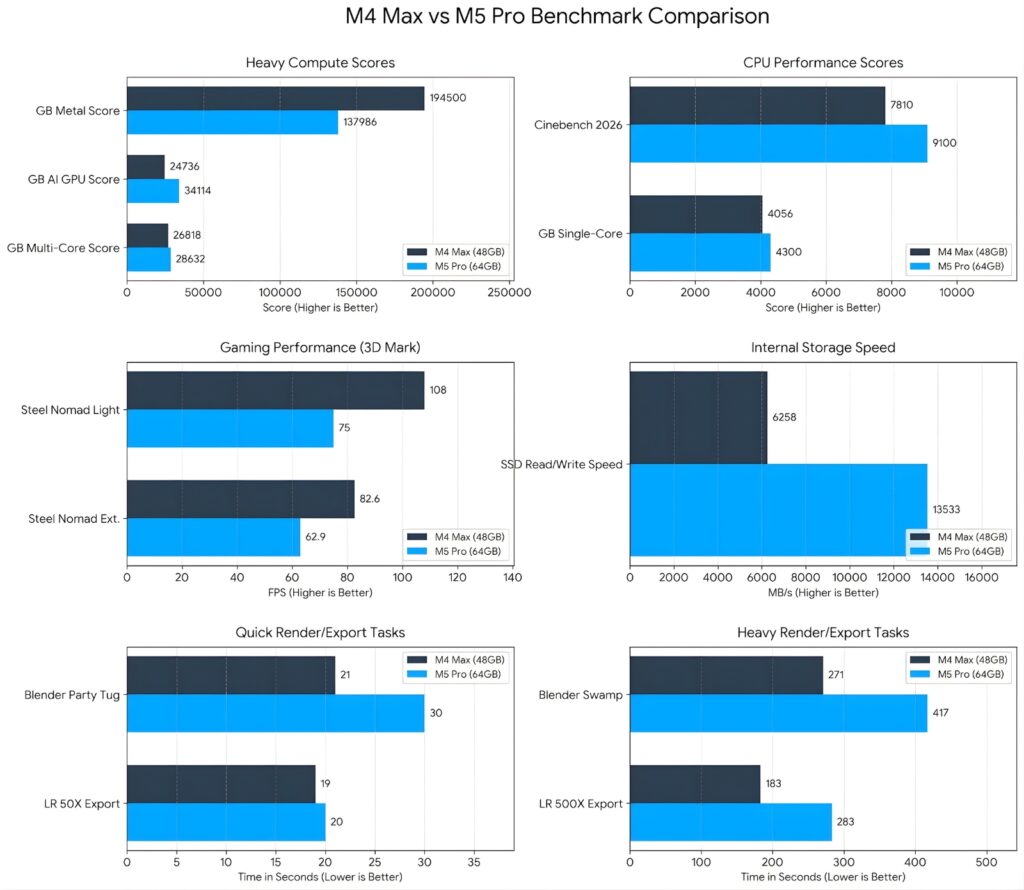
Sustained Cinebench testing tells the story clearly. Under a 10-minute CPU stress test, the base M5 scores around 4,476 points. The M5 Pro hits 8,613. That’s a 93% difference — and it comes down to one straightforward thing: more cores doing more work at the same time.
Single-core performance is closer between the two. If your work is mostly sequential (writing, light editing, browsing, video calls), you won’t feel that gap. Multi-core is where the M5 Pro separates itself.
Thermal Behavior — One Fan vs Two Makes a Bigger Difference Than You’d Think
Here’s something most reviews mention briefly and then move on from. The base M5 runs a single-fan cooling system. The M5 Pro has a dual-fan setup.
Under sustained load, the base M5 averages around 26 watts and the fan noticeably spins up. The M5 Pro pulls 45 watts but runs cooler, because the dual fans were designed specifically for that thermal profile. More power, quieter operation.
If you do long export sessions or leave heavy tasks running in the background, the M5 Pro’s thermals are worth thinking about. The base M5 isn’t a problem at lighter workloads, but it starts to show under pressure.
GPU Performance: Who Actually Needs the M5 Pro’s Extra Cores?
The M5 Pro’s GPU (20 cores) is meaningfully ahead for GPU-heavy work. What’s interesting is that the M5 Pro’s GPU is only about 14% slower than the previous M4 Max despite having far fewer cores. The GPU architecture improvements this generation are real.
For most creative work — photo editing, motion graphics, moderate 3D work — the M5 Pro GPU is more than enough. If you’re doing high-end VFX or serious 3D rendering daily, the M5 Max is the real conversation. But for performance benchmark tests that cover the middle ground of creative workflows, the M5 Pro holds up well.
Battery Life — Which One Actually Lasts Longer in Real Use?
Base M5 Battery: The Numbers and What They Actually Mean
The base M5 is rated for 16 hours of web browsing and 24 hours of video playback. In real-world usage, you’re looking at something more like 12-14 hours on mixed workloads. That’s still excellent. For most people working a full day away from an outlet, the base M5 will make it.
The fast charging via MagSafe is consistent too. Around 50% charge in about 30 minutes with the right adapter, which in practice means plugging in over lunch gets you through the afternoon.
M5 Pro Battery: The Trade-off Nobody’s Talking About
Here’s the honest part. The M5 Pro is rated for 22-24 hours, which sounds incredible. But once you push it with video editing or anything GPU-intensive, battery life drops to around 10-12 hours. It’s still good. It’s just not the headline number.
And because the M5 Pro is pulling more power under load than the base M5, if you’re doing heavy work unplugged, the gap between the two narrows. The base M5 is actually the better pure battery machine if extended unplugged work is your main concern.
Who Should Actually Buy the Base M5 vs the M5 Pro
This is the part that most reviews skip because it requires saying something direct.
The Base M5 Makes Sense If…
You’re doing standard professional work. Writing, design, moderate video editing, software development, content creation. You value battery life and want the lightest possible carry. You’re coming from an M1 or M2 MacBook and want a significant upgrade without the premium price. For this group, the base M5 is a great machine and the $500 difference is real money.
It also makes sense if you’re keeping an eye on the MacBook reviews landscape and you know the M6 redesign is reportedly coming in late 2026 or 2027 with a full chassis overhaul. Paying less now for a chip that will handle everything you need for the next 3 years is a reasonable call.
The M5 Pro Makes Sense If…
Your workflows push the CPU and GPU simultaneously. Local AI model work, 4K+ video editing, 3D modeling, large Xcode projects. You’re already hitting limits on an M3 or M4 Pro and you need the thermal headroom. You want Thunderbolt 5 connectivity and multi-monitor support at higher resolutions — the M5 Pro supports up to three external displays, the base M5 supports two.
The M5 Pro also holds its value differently for professional use. If the machine is a billable tool, the upgrade pays for itself quickly.
Is Now Even the Right Time to Buy?
Reports suggest a full MacBook Pro redesign is coming with M6 chips, likely featuring an OLED display and a thinner chassis. If you’re on an M3 or M4 and your machine is running fine, waiting is reasonable. If you’re on M1, M2, or anything older and you’re feeling it daily, the performance jump on either M5 model is significant enough to not wait.
What I’d Tell Someone Upgrading From an M1, M2, or M4
Coming From M1 or M2: Pick Either One and Don’t Look Back
Honestly, if you’re still on M1 or M2, both the M5 and M5 Pro are going to feel like a completely different machine. The performance gap is large, the SSD speeds are dramatically better, and battery life is meaningfully improved. The decision between M5 and M5 Pro matters less for this group because either machine is a major step up.
You can run through your current productivity workflows and realistically decide if the base M5 covers your needs. It probably does.
Coming From M4 Pro: Is the M5 Pro Worth It?
This is the harder question. The M5 Pro is about 23% faster overall than the M4 Max, which is a real number. But if your M4 Pro is handling your work without obvious bottlenecks, the upgrade is hard to justify on performance alone.
The SSD speed improvement is the most tangible real-world change for M4 Pro users. If you work with large files regularly, that’s meaningful. Otherwise, the M5 Pro is more about headroom for the next few years than fixing a current problem.
If you do upgrade, the Mac fixes and optimization guides are worth a look for getting the new machine set up properly from day one.
The Takeaway
The base M5 MacBook Pro is the right call for most people. It handles professional workloads well, the battery is excellent, and the $500 savings is real. If you’re not regularly hitting the limits of a current-gen chip, you won’t feel what you’re missing.
The M5 Pro is for people who know they need it. Sustained heavy workloads, better thermals under pressure, Thunderbolt 5, and more memory bandwidth for demanding creative and AI workflows. If those things apply to your day-to-day, the upgrade is justified.
And if you’re sitting on an M3 or M4 Pro that’s still running strong, there’s a case for waiting to see what the M6 redesign brings.
What’s your current setup and what workload are you trying to cover? Drop it in the comments and I’ll give you a straight answer on which one makes sense.



One Response