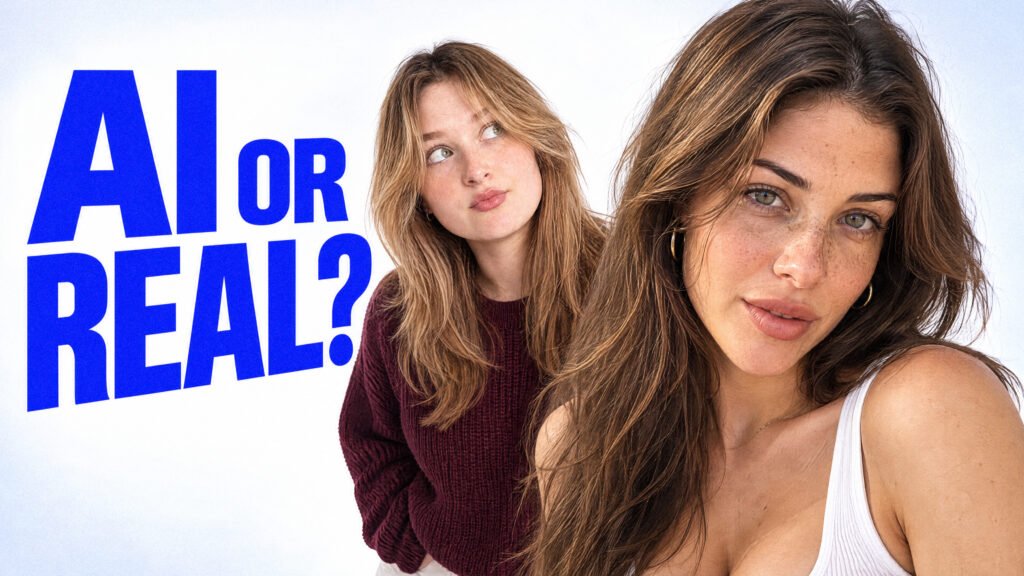
From AI-generated characters and realistic lifestyle vlogs to fashion videos and UGC content, here’s how I created four different AI videos using GPT Image 2.5, Seedance 2.5, and carefully prepared visual references.
By TheByteLab | AI Tools & Tutorials | November 2026
Most people have tried generating an AI video only to end up with something that looks obviously artificial. Faces change between shots, movements feel unnatural, and even simple actions can look strange.
But AI video generation has improved dramatically.
I recently experimented with Higgsfield AI, combining GPT Image 2.5 for image generation with Seedance 2.5 for video creation. The goal was simple: generate realistic videos without traditional filming, manual character animation, or complicated post-production.
Instead of testing one scene, I created four different projects:
- A realistic late-night gym vlog
- A 30-second fashion try-on video with detailed clothing references
- A lifestyle UGC-style video using a generated AI character
- A realistic kitchen vlog featuring everyday cooking actions
The results were surprisingly convincing, especially when using character sheets and carefully organized visual references.
In this guide, I’ll break down each project, explain how the references were created, and share the exact prompt sections so you can recreate the workflows.
[EMBED YOUTUBE VIDEO: Full TheByteLab / Creative Toolkit tutorial]
What You’ll Need
For these workflows, I used the following tools:
| Tool | Purpose |
|---|---|
| Higgsfield AI | Main platform for image and video generation |
| GPT Image 2.5 | Character images, reference sheets, environments and product details |
| Seedance 2.5 | Realistic video generation with movement and audio |
| Higgsfield Genjutsu | Bonus method for recreating popular video styles |
| ChatGPT (optional) | Writing and improving detailed prompts |
The important part is that you don’t need professional animation experience to begin.
A good starting image, clear instructions, and consistent references can take you a long way.
Project 1: Creating a Realistic AI Gym Vlog
Goal: Generate a believable fitness vlog with a consistent female character, casual handheld camera movement, realistic gym lighting, and natural everyday behavior.
Step 1: Start With a Character Reference
For the first project, I started with a single character image.
You can use an original photo that you own or have permission to use, or generate a completely new character with GPT Image 2.5.
The reference should clearly establish the character’s appearance, including facial features, hairstyle, clothing, and body proportions.
For this example, I already had the character image, so I moved directly to creating a reference sheet.
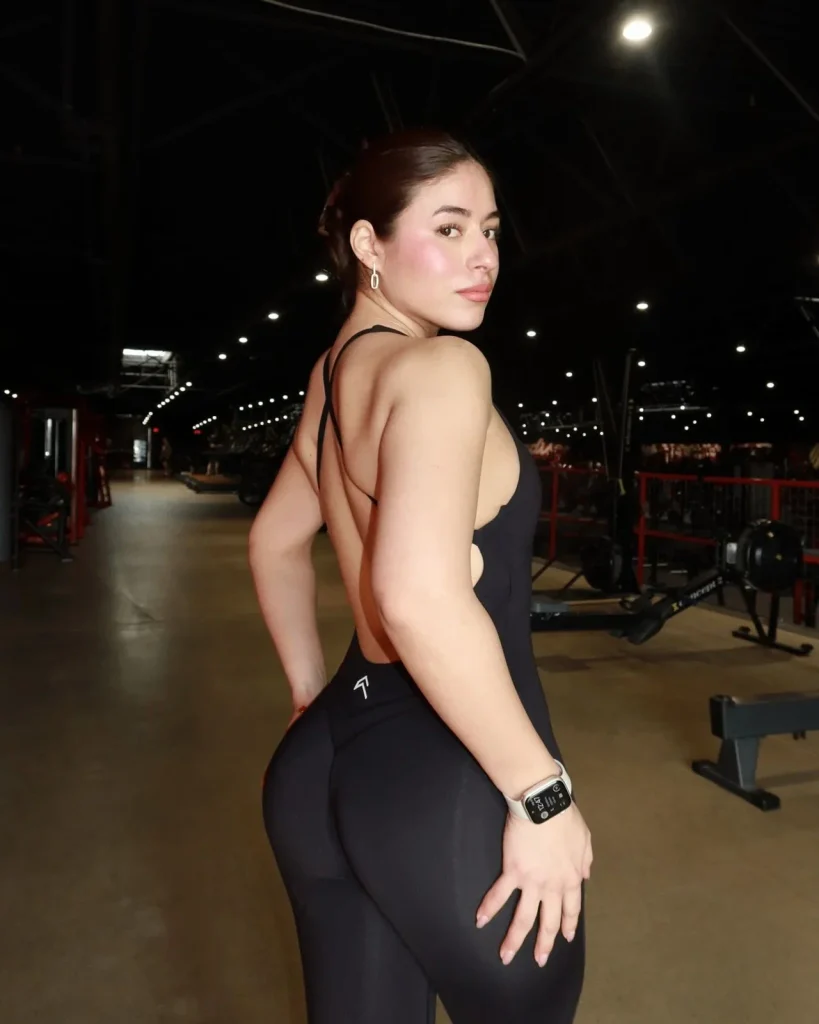
Character Reference
Model: Use yourself photo. I picked one for demo
Step 2: Generate a Professional Character Sheet
Instead of sending only one picture to the video model, I created a professional three-panel reference sheet.
This included a full-body front view, a side view, and a detailed facial close-up.
Why does this matter?
When an AI video model receives only one image, it has limited visual information about how the character should appear from different angles.
A character sheet provides additional guidance for maintaining the same face, hairstyle, outfit, and proportions during generation.
In Higgsfield:
- Open the Image section.
- Select GPT Image 2.5 Sunburst.
- Upload the original character image.
- Paste the character sheet prompt.
- Choose a landscape format suitable for the three panels.
- Generate and inspect the result.
Full Gym Character Sheet Prompt
Model: GPT Image 2.5 Sunburst
Reference: Original character image
Prompt:
[ Create a photorealistic, professional 3-panel character reference sheet of the EXACT SAME adult woman shown in the uploaded gym photograph.
CRITICAL: REFERENCE MATCHING, NOT CHARACTER REDESIGN.
The uploaded photograph is the authoritative source for her facial identity, natural beauty, body shape, hairstyle, skin tone, athletic outfit, and overall appearance.
Reconstruct the same recognizable woman from multiple angles. Do not replace her face with a generic AI fitness influencer, artificially enhance her body, or reinterpret her appearance.
OUTPUT FORMAT
One single high-resolution 16:9 landscape image containing exactly THREE vertical panels arranged left to right.
Panel proportions: 30% front view, 30% side view, 40% facial close-up.
Use clean, subtle white separators.
Same woman, same outfit, same hairstyle, same lighting, and consistent anatomy across all three panels.
PANEL 1: FULL-BODY FRONT VIEW
Show the woman standing naturally, facing directly toward the camera.
Full body visible from head to feet.
Neutral standing posture, feet naturally spaced.
Arms relaxed beside her body.
Shoulders level, realistic weight distribution.
Calm, confident facial expression.
Her natural athletic, curvy physique must match the original.
Preserve her natural shoulder width, bust proportions, defined waist, rounded hips, and muscular yet feminine legs.
Show the correct front construction of her fitted black athletic jumpsuit.
Use a realistic standing pose, not a fitness-model advertisement pose.
PANEL 2: FULL-BODY LEFT PROFILE VIEW
Show the exact same woman standing in a true 90-degree left-side profile.
Entire body visible from head to feet.
Head facing horizontally to the left.
Arms resting naturally.
Preserve the exact curvature of her back, waist, hips, and legs.
Natural bust projection and torso depth.
Accurate glute and hip proportions without exaggeration.
Show the original open-back design and thin shoulder straps of her black jumpsuit.
Maintain anatomically accurate posture and garment tension.
Her physique must be identical to Panel 1, viewed from the side.
PANEL 3: DETAILED FACIAL IDENTITY PORTRAIT
Large, realistic head-and-shoulders portrait of the SAME woman.
She faces the camera in a gentle three-quarter angle, maintaining natural eye contact.
FACIAL IDENTITY LOCK:
Adult woman in her twenties.
Light warm-beige skin tone with natural rosy cheeks.
Soft oval face with a gently defined jawline.
Warm brown eyes with a subtle hazel appearance.
Naturally arched, medium-thick dark eyebrows.
Straight, delicately shaped nose with a softly rounded tip.
Naturally full, softly defined pink lips.
Gentle cheekbone definition.
Natural eyelid folds and realistic eye spacing.
Slightly flushed cheeks and subtle natural skin variation.
Soft, confident, composed expression.
Recognizable facial geometry matching the uploaded photograph.
Preserve the exact proportions of her eyes, nose, lips, forehead, chin, and jaw.
Do not beautify, reshape, stylize, or idealize her face.
HAIR IDENTITY LOCK
Dark chestnut-brown hair with subtle warm reddish-brown highlights.
Hair is neatly pulled back into a compact low bun, with a natural off-center part and a few subtle loose strands.
Preserve the original hairline, forehead exposure, hair density, and natural texture.
The same tied-back hairstyle must appear in all three panels.
No loose flowing hair, ponytail, extensions, or alternative hairstyle.
BODY IDENTITY LOCK
The reference woman has a naturally curvy, athletic adult physique.
Balanced feminine shoulder structure.
Toned upper arms.
Naturally full bust.
Defined waist.
Rounded, proportionate hips.
Developed glutes and thighs from athletic training.
Natural torso-to-leg ratio.
Realistic skin folds and muscle transitions.
Identical silhouette and body volume across views.
Do not artificially increase curves, narrow her waist, enlarge her bust, or exaggerate her glutes.
This is anatomical reference reconstruction, not body enhancement.
WARDROBE LOCK
Preserve the original athletic clothing:
A fitted, matte-black, sleeveless, one-piece workout jumpsuit with a form-fitting athletic fabric.
Thin black shoulder straps.
Deep open-back construction.
Crossed strap details across the upper back.
Close-fitting waist and hips.
Black fitted leggings integrated into the jumpsuit.
Realistic fabric stretch, seams, and natural tension.
Small, discreet original branding detail where visible.
Accessories:
Small elongated silver drop earrings.
Rectangular smartwatch with a light-colored strap, matching the reference wrist.
No additional jewelry or accessories.
The original image does not clearly show her shoes. Complete the unseen footwear with simple, understated black athletic training shoes, keeping both full-body panels consistent.
Do not replace the jumpsuit with a sports bra, shorts, separate leggings, dress, or casual outfit.
LIGHTING AND ENVIRONMENT
Professional neutral character-reference photography.
Seamless light-gray studio background.
Soft, even, diffused lighting.
Neutral white balance.
Gentle, realistic shadows.
Natural skin color.
No gym environment.
No dramatic flash photography.
No golden-hour or cinematic color grading.
All three panels must have identical lighting and color treatment.
PHOTOGRAPHIC REALISM
The result should resemble real production reference photography, not AI-generated glamour imagery.
Use realistic photographic rendering with:
Natural skin pores and texture.
Slight facial asymmetry.
Realistic hair strands.
Soft natural optical detail.
Accurate human anatomy.
Realistic garment material.
Subtle skin imperfections.
Natural color transitions.
No excessive digital sharpening.
No artificial skin smoothing.
Maintain a realistic 50mm photographic perspective for full-body views and a natural 85mm portrait perspective for the close-up.
ABSOLUTE NEGATIVE CONSTRAINTS
No different woman.
No altered facial identity.
No generic AI influencer face.
No facial beautification or restructuring.
No exaggerated hourglass figure.
No artificial body enhancement.
No altered skin tone.
No loose hairstyle.
No changes to the original black jumpsuit.
No glamour makeup.
No fashion-model posing.
No overly sharp skin texture.
No CGI or 3D-rendered appearance.
No inconsistent body proportions.
No duplicate anatomy.
No incorrect hands.
No extra fingers.
No cropped heads or feet.
No text, captions, annotations, or watermarks.
No additional panels.
FINAL PRIORITY:
Identity consistency is more important than aesthetic enhancement.
The three panels must convincingly depict ONE IDENTICAL REAL WOMAN, photographed from three different angles during the same studio reference session.
The final image must be suitable as a permanent character identity reference for realistic AI video generation.
]
Step 3: Turn the Character Into a Video
With the character sheet ready, I moved to the Video section and selected Seedance 2.5.
I attached the character sheet as a visual reference and used a detailed prompt describing the character’s actions, camera movement, location, lighting, and sound.
For this project, I wanted the footage to resemble a casual fitness influencer recording her own vlog, rather than an expensive commercial.
That meant prioritizing natural handheld movement, imperfect framing, believable autofocus behavior, and realistic gym atmosphere.
Full Gym Vlog Video Prompt
Model: Seedance 2.5
Reference: Three-panel character sheet
Duration: 30 seconds
Prompt:
Final Result
“CAMERA:
DV 16mm tape camcorder handheld aesthetic. A gorgeous glamorous European fitness influencer films herself directly by hand in selfie-cam and first-person style. Keep realistic hand shake, slightly crooked framing, delayed autofocus, awkward zoom-ins and zoom-outs, occasional motion blur, and small framing mistakes where part of her face briefly slips out of frame. Mix handheld selfie footage with a few fixed external shots. Important: never show her placing, adjusting, or setting up a camera. When switching from handheld footage to a fixed external angle, use a clean jump cut as if the camera had already been positioned before the shot began. The camera itself must never appear on screen.
LOOK:
Soft digital tape camcorder look with subtle vintage DV character. Slight blur, faint tape noise, mild highlight bloom under gym lighting, subtle auto-exposure flicker, muted contrast, realistic skin texture, believable indoor lighting, realistic skin tones.
STYLE:
A realistic late-night gym vlog with a sexy Instagram-model vibe. The tone is playful, confident, a little flirty, slightly breathless, and natural. She is clearly attractive and charismatic, but the video should still feel like a believable self-recorded vlog, not a polished commercial. Fast clean jump cuts, strong continuity, natural body language, no awkward dead moments.
CHARACTER:
An exceptionally beautiful glamorous European brunette woman in her mid-20s. She has a highly photogenic face, large almond-shaped brown eyes, long lashes, full glossy lips, sculpted cheekbones, a refined nose, flawless lightly tanned glowing skin, and long thick glossy dark-brown hair tied in a high ponytail. She looks like a high-end Instagram fitness and lifestyle influencer, not an ordinary gym visitor. She has a slim, feminine, athletic hourglass figure. She wears polished soft-glam makeup, a fitted stylish long-sleeve athletic crop top, high-waisted fitted leggings, clean white sneakers, and a towel around her neck or over one shoulder. No jewelry.
SETTING:
A quiet modern gym late at night. Mirror wall, dumbbell rack, flat bench, stretching mat, a water bottle on a bench, soft warm overhead lights, mostly empty space, calm atmosphere, no crowd, no trainer, no extra people.
IMPORTANT CONTINUITY RULES:
The same woman must remain fully consistent in every shot. No face changes, no hairstyle changes, no outfit changes, no body changes. No extra people appearing. No duplicated limbs. No broken hands. No disappearing water bottle. No broken gym equipment. No impossible movements. No camera visible. No camera setup shown. Keep her beautiful, polished, and photogenic in every shot.
STORYBOARD (30 seconds total, 10 cuts):
(~3s, arm’s-length selfie) She walks slowly through the gym holding the camera herself, slightly out of breath but smiling confidently. Dialogue: “Okay… late-night gym vlog.”
(~3s, handheld pan across the room and back to her) The camera drifts across the dumbbell rack, mirror wall, and empty gym floor, then returns to her face. Dialogue: “It’s basically empty in here.”
(~3s, mirror selfie angle) She stops near the mirror, adjusts her ponytail, glances at herself, then smirks at the lens. Dialogue: “I look tired, but we’re still doing this.”
(~3s, fixed external medium shot) Jump cut to a fixed shot. She is already in position near the bench, picks up a pair of dumbbells, and gets ready. No camera setup shown. No dialogue.
(~3s, same fixed shot) She performs a short controlled set of dumbbell shoulder presses or dumbbell chest presses with clean form, then lowers the weights and exhales with a smile. Dialogue: “That woke me up fast.”
(~3s, handheld walking selfie) She picks the vlog back up in selfie mode, towel over one shoulder, breathing a little harder as she walks a few steps. Dialogue: “Upper body done… and I’m already dying.”
(~3s, tight handheld close-up) She grabs the water bottle, takes a drink, lowers it, and exhales in relief. Dialogue: “Best part of the workout.”
(~3s, fixed external wider shot facing the mirror) Jump cut to a fixed shot. She does a quick playful stretch, a small mirror pose, then laughs softly at herself. Dialogue: “A little stretch so I can pretend I’m disciplined.”
(~3s, handheld close selfie) Her cheeks are slightly flushed, she brushes back a loose strand of hair, smiling in a tired but satisfied way. Dialogue: “I always say quick workout… and then stay forever.”
(~3s, arm’s-length selfie ending) She walks toward the exit, still filming herself, gives a tired little wave and a genuine smile. Dialogue: “Okay, I’m done. Good night.”
FINAL INSTRUCTION:
The result must feel like a real self-recorded late-night gym vlog by a glamorous Instagram fitness influencer. Prioritize realistic handheld motion, strong continuity, believable pacing, natural breathing, attractive appearance, and subtle imperfection. Keep it sexy, polished, and realistic — not artificial, not stiff, not boring.”
The most interesting part of this result was how natural the overall footage felt.
The handheld movement, lighting, facial appearance, and casual vlog presentation helped the generation feel closer to genuine smartphone footage.
This project demonstrated that realistic AI video doesn’t always require cinematic camera movements. Sometimes the small imperfections are what make footage believable.
Project 2: Creating a 30-Second Fashion Try-On Video With Multiple References
Goal: Generate a realistic smartphone fashion video while preserving the character’s identity, clothing details, and apartment environment throughout the scene.
This was a more advanced experiment because I wanted to control several different visual elements within a single video.
Rather than relying on one reference, I created separate images for the character, apartment, outfit, and clothing details.
Step 1: Build the Character Reference Sheet
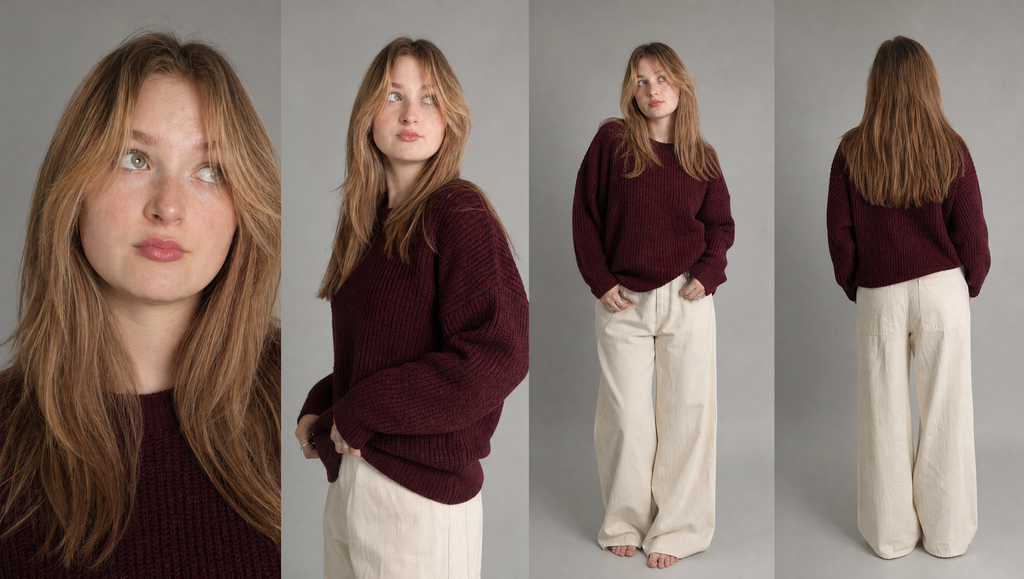
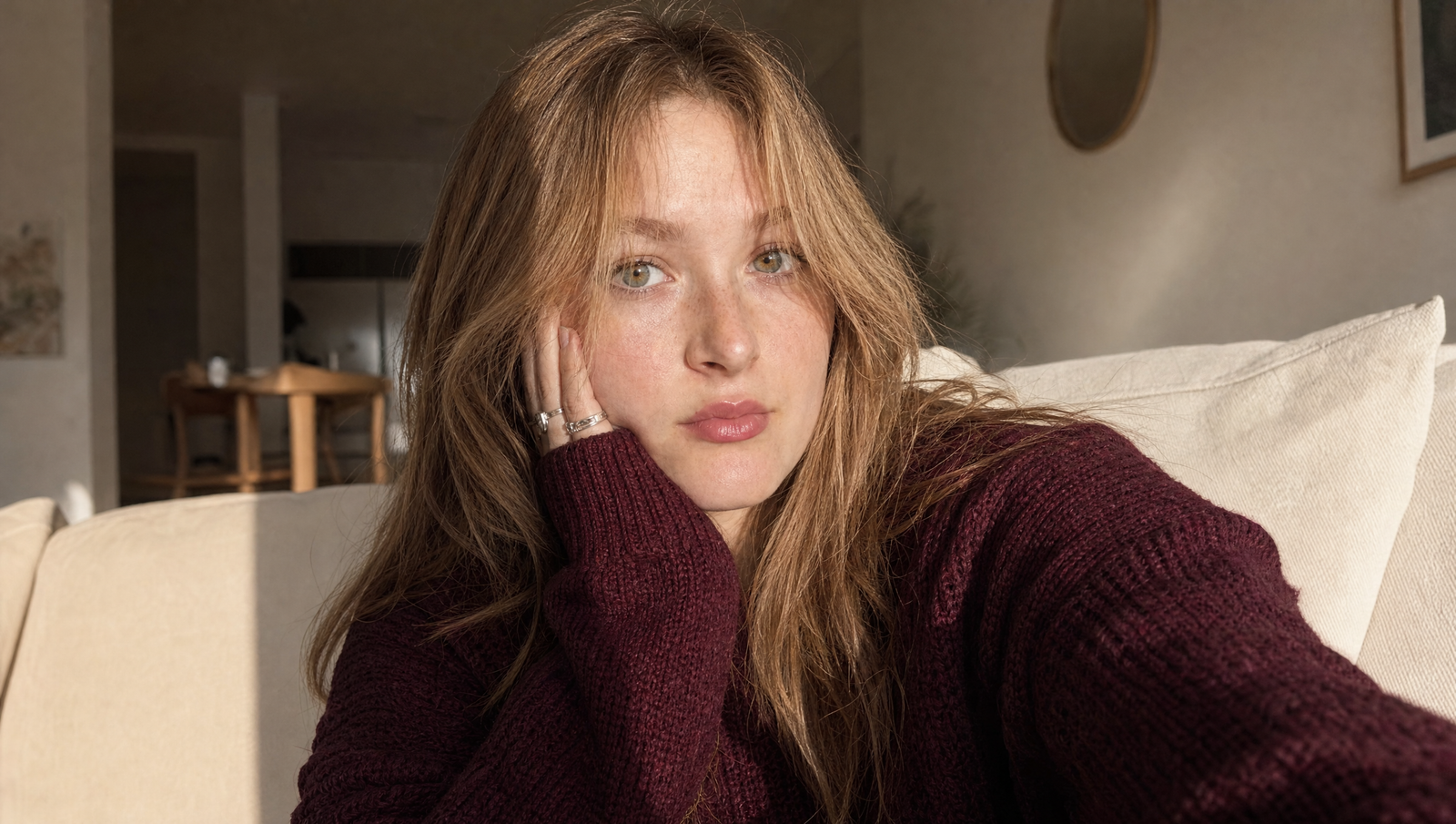
I started with a female character wearing a burgundy knitted sweater and light-colored trousers.
Using GPT Image 2.5, I generated a multi-angle character reference sheet showing her appearance from different viewpoints.
The purpose was to establish a recognizable character before introducing other visual elements.
Full Fashion Character Sheet Prompt
Model: GPT Image 2.5
Reference: Original fashion character image
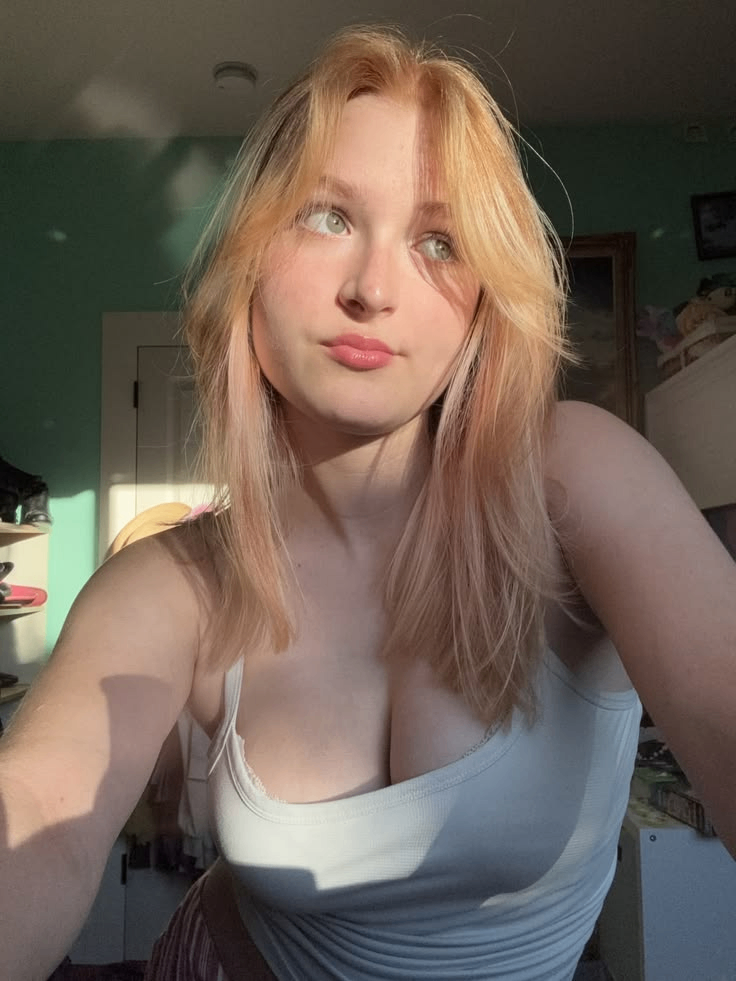
Prompt:
[“Create a photoreal four-panel reference sheet from the supplied selfie: face close-up, three-quarter portrait, full-body front and back. Same woman throughout: natural freckles, hazel-green eyes, long brown hair with caramel highlights, silver rings, oversized burgundy knit sweater, cream wide-leg trousers, bare feet. Neutral gray background, soft studio light. Preserve pores, fine hairs and knit texture. No smoothing, identity changes or extra people.]
Prompt:
[ Close handheld smartphone selfie of the same woman on a cream sofa, cheek resting on her left hand. Burgundy sweater, silver rings, warm window sunlight across her face. Softly blurred apartment behind her. Natural skin, sharp eyes and knit detail, slight wide-angle distortion. ]
Step 2: Create the Apartment Environment
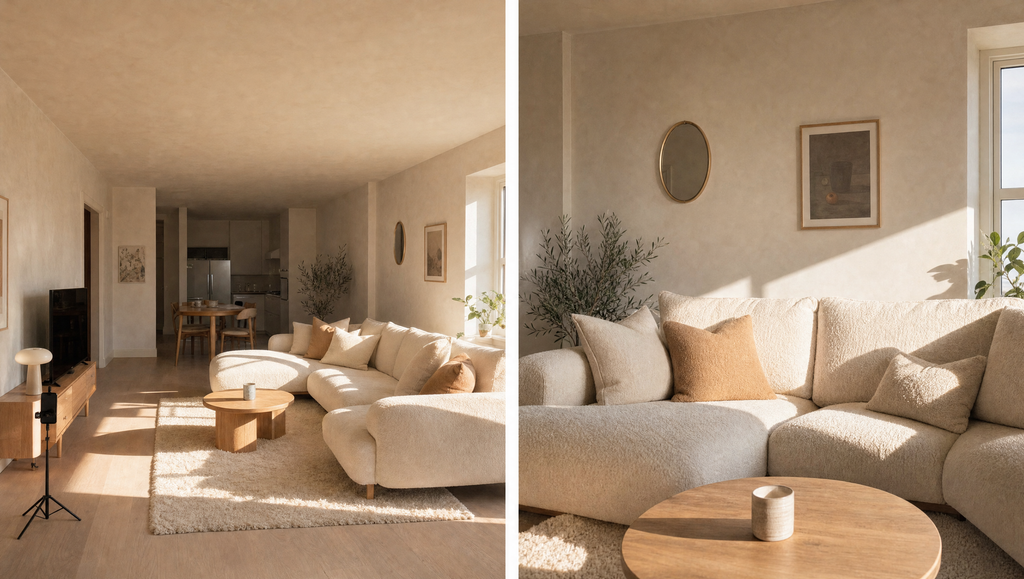
Next, I generated an apartment environment to use as the setting for the fashion vlog.
Instead of generating only one room photograph, I created two complementary views of the same apartment.
The environment featured warm natural lighting, neutral furniture, and a realistic residential atmosphere.
Having multiple views of the location helped communicate the desired room layout, furniture placement, colors, and lighting.
Full Apartment Environment Prompt
Model: GPT Image 2.5
Prompt:
[ Two views of the same empty apartment: wide establishing shot and medium sofa view. Cream bouclé sofa, tan and cream cushions, off-white plaster wall, square window, pale oak floor, slim black phone tripod. Golden afternoon sun from camera-right. Keep layout, window placement and light direction consistent. ]
Step 3: Generate Clothing Product References
For this project, clothing accuracy was especially important.
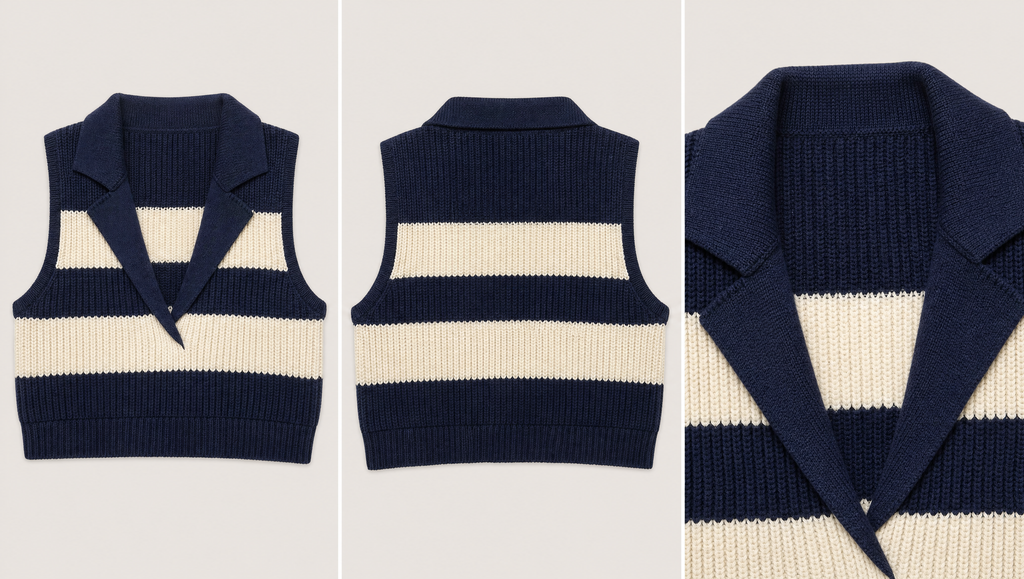
I wanted the fashion item to maintain recognizable fabric patterns, collar details, colors, and proportions during the video.
So I created a separate product reference sheet showing the knitted vest from the front and back, together with a close-up of its collar and fabric texture.
This gave the video model a more detailed visual description of the garment.
Full Clothing Reference Prompt
Model: GPT Image 2.5
Prompt:
[Three-panel product reference: front, back and collar detail. Cropped navy-and-cream striped rib-knit vest, navy notched lapel, deep V-neck and navy hem. Neutral background, soft studio lighting, visible knit loops. Preserve stripe order, widths and collar shape. No model or hanger.”]
Step 4: Generate the Clothing Label Close-Up
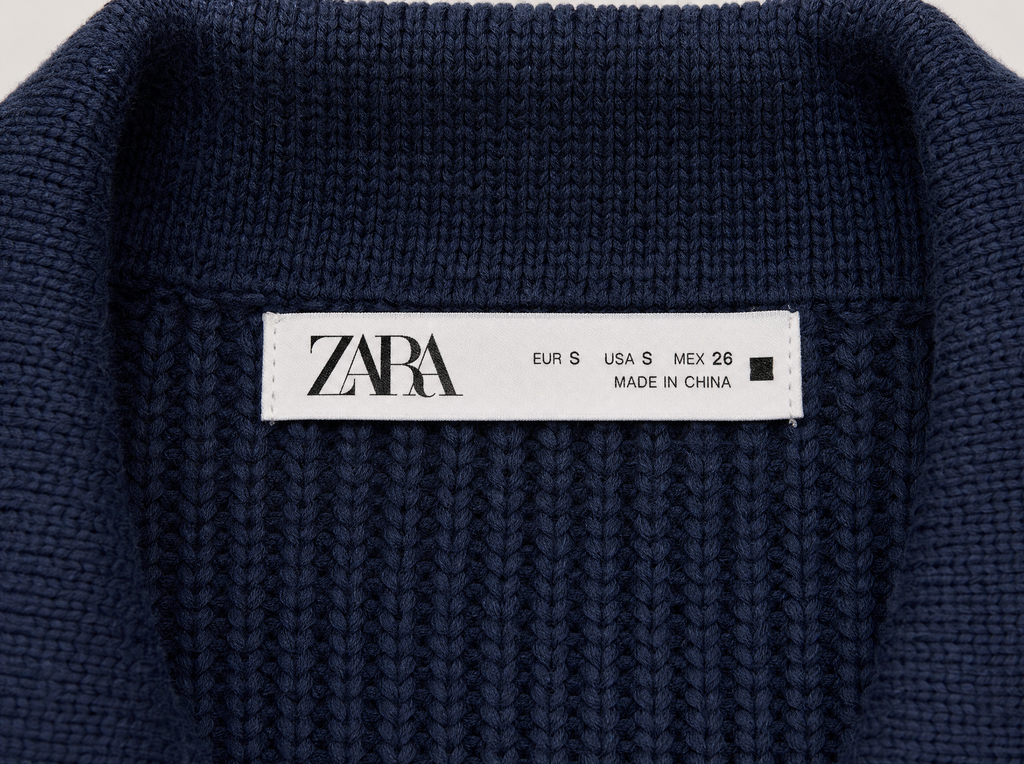
I also experimented with a close-up image of the garment’s internal clothing label.
This was a useful test of how precisely the image model could represent small printed details, woven fabric, stitching, and product textures.
For commercial projects, use fictional branding or labels that you have permission to reproduce.
Full Clothing Label Prompt
Model: GPT Image 2.5
Reference: Garment product sheet
Prompt:
[ Close-up product detail shot of the inside ZARA label stitched into it ]
Step 5: Combine the References in Seedance 2.5
Once the supporting images were ready, I opened Seedance 2.5 and uploaded the relevant references.
These included the character, fashion product, apartment, and garment details.
I then wrote a video prompt describing a realistic smartphone try-on vlog.
The intended result was a natural 30-second fashion video where the character interacts with the garment in a consistent interior setting.
The references were there to guide what the person, location, and outfit should look like, while the prompt described what should actually happen.
Full Fashion Video Prompt
Model: Seedance 2.5
Duration: 30 seconds
References: Character, apartment, garment and clothing details
Prompt:
[ Create a 30-second, 9:16 smartphone fashion try-on video at 1080p. Two continuous takes, with exactly one hard cut at 0:20. Same woman, room, lighting and garment throughout.
0–5s: Close handheld selfie. She says: ‘Okay… I just tried Claude Sonnet 5.5, and honestly? It’s insane.’
5–8s: She stands and clips the phone onto the tripod. Natural wobble, clamp click. ‘Hold on.’
8–13s: Shows the vest front and back. ‘So, this vest. Navy and cream rib, and this little collar.’
13–16s: Brings the inside label close. Autofocus briefly hunts, then locks. ‘Zara, obviously.’
16–20s: Removes her sweater over a skin-tone tank that stays in place, then puts on the vest. Hair catches briefly; fabric moves with real weight.
20–25s: Hard cut to the outfit check. She adjusts the collar, smooths the vest and turns slightly. ‘Okay… yeah. Obsessed.’
25–30s: Picks up the phone and returns to a close selfie. ‘And the craziest part? Sonnet 5.5 wrote this whole video.’
Natural pauses, small uneven smiles, precise lip sync, handheld shake and exposure changes. Tripod framing stays fixed until she lifts the phone.
Keep faces, freckles, hair, room geometry, stripe pattern and label consistent. No extra people, visible filming phone, captions, watermarks or beauty filter. Only voice, footsteps, fabric rustle, tripod clicks and room tone. No music. ]
Final Result
This project shows why reference preparation can matter just as much as the video prompt.
By developing the character, environment, and garment separately, I had more control over the details before asking Seedance to animate the scene.
Key takeaway: When a video involves specific products, clothing, or environments, create dedicated references for those elements instead of expecting one general prompt to describe everything perfectly.
Project 3: Creating Realistic AI UGC-Style Videos
Goal: Create a casual, realistic lifestyle video that resembles social media content recorded by an individual creator.
UGC stands for user-generated content. Brands often use this style of video because it feels more personal and conversational than traditional advertising.
AI-generated UGC-style videos are becoming an interesting creative option for product concepts, promotional experiments, social content, and advertising prototypes.
However, creating believable UGC isn’t simply about generating a beautiful character.
The footage needs realistic camera behavior, expressive movement, appropriate surroundings, and a natural human presentation.
Step 1: Create the AI Character
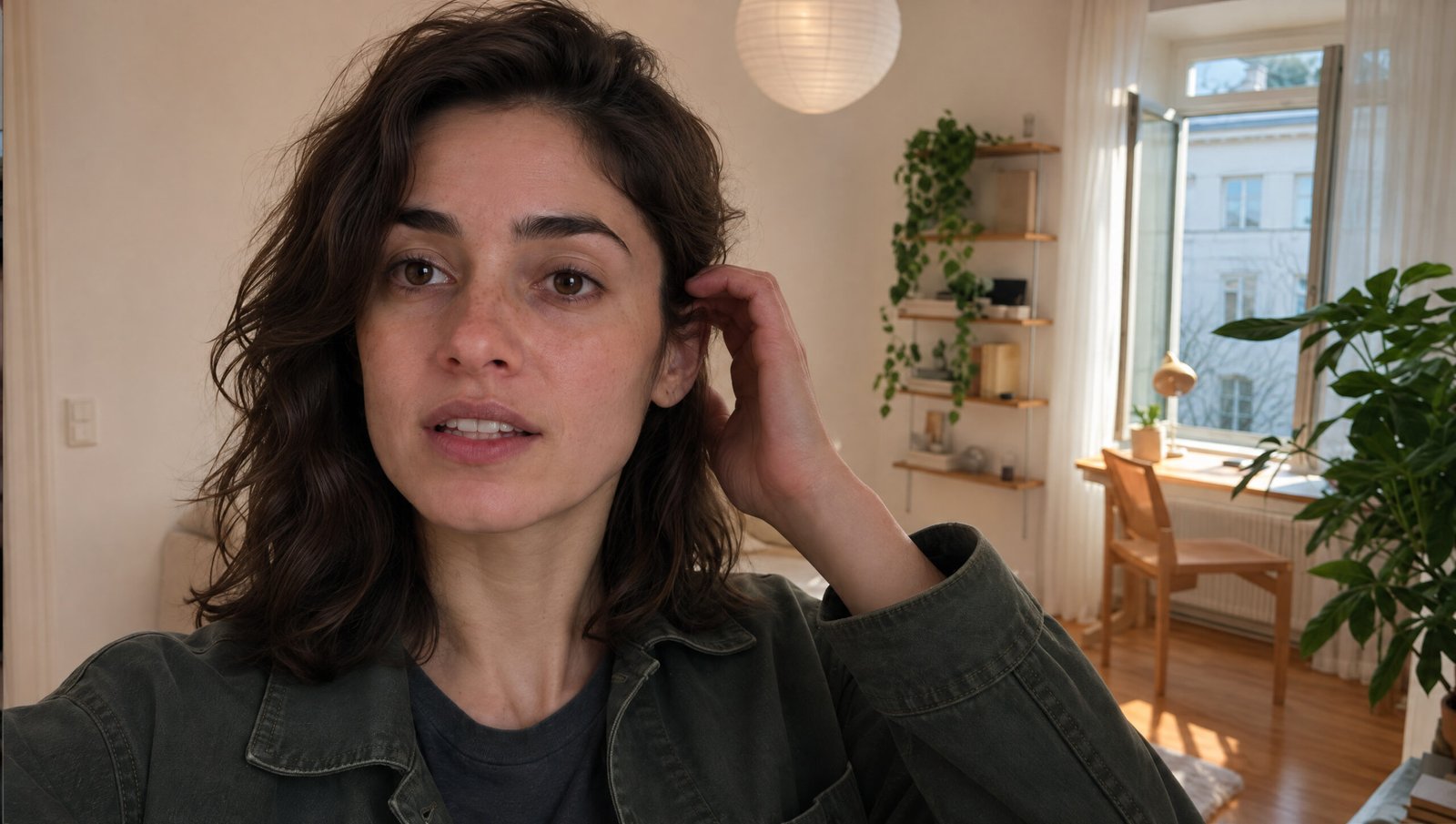
[INSERT IMAGE: Original female character on a sunny terrace]
For this example, I created a realistic female character in a casual lifestyle setting.
The image established her facial appearance, hairstyle, skin details, and overall visual identity.
I used natural daylight and a smartphone photography aesthetic to make the reference feel authentic.
Full UGC Character Prompt
Model: GPT Image 2.5 Sunburst
Prompt:
[PASTE YOUR COMPLETE UGC CHARACTER CREATION PROMPT HERE]
Step 2: Create a Six-Panel Facial Reference Sheet
[INSERT IMAGE: Six-panel character reference sheet]
Next, I generated a detailed six-panel character sheet.
Unlike the simpler three-panel reference used in the first project, this sheet focused on multiple facial angles and expressions.
The additional views gave the model visual guidance for the character’s face when looking forward, sideways, downward, or toward the camera from different perspectives.
This is particularly useful for close-up vlog scenes where the face remains visible for most of the video.
Full Six-Panel Character Sheet Prompt
Model: GPT Image 2.5 Sunburst
Reference: Original UGC character image
Prompt:
[PASTE YOUR COMPLETE SIX-PANEL FACIAL CHARACTER REFERENCE PROMPT HERE]
Step 3: Generate the UGC Video
[INSERT IMAGE: Seedance 2.5 video generation settings]
I then uploaded the character reference to Seedance 2.5.
The prompt focused on casual smartphone footage rather than dramatic cinematic production.
For believable lifestyle content, it helps to specify how the camera should behave, how the character interacts with it, and what sounds belong in the environment.
The goal isn’t necessarily perfect camera movement.
It’s creating a scene that feels like something a real person could have recorded.
Full UGC Video Prompt
Model: Seedance 2.5
Reference: Six-panel character sheet
Prompt:
[PASTE YOUR COMPLETE UGC VIDEO PROMPT HERE, INCLUDING CHARACTER ACTIONS, CAMERA STYLE, MOVEMENT, SETTING, AUDIO, AND TIMING]
Final Result
[EMBED FINAL UGC VIDEO HERE]
This experiment demonstrated how a consistent AI character can be used to create casual lifestyle content without recording a traditional video shoot.
For creators, marketers, and freelancers, the workflow is useful for exploring ad concepts and testing creative ideas.
Keep in mind that AI-generated UGC should be disclosed appropriately and must not be presented as a real customer testimonial or genuine product experience when it is not.
Project 4: Creating an Ultra-Realistic AI Kitchen Vlog
Goal: Create a realistic everyday cooking vlog featuring an AI-generated female character preparing food in a kitchen.
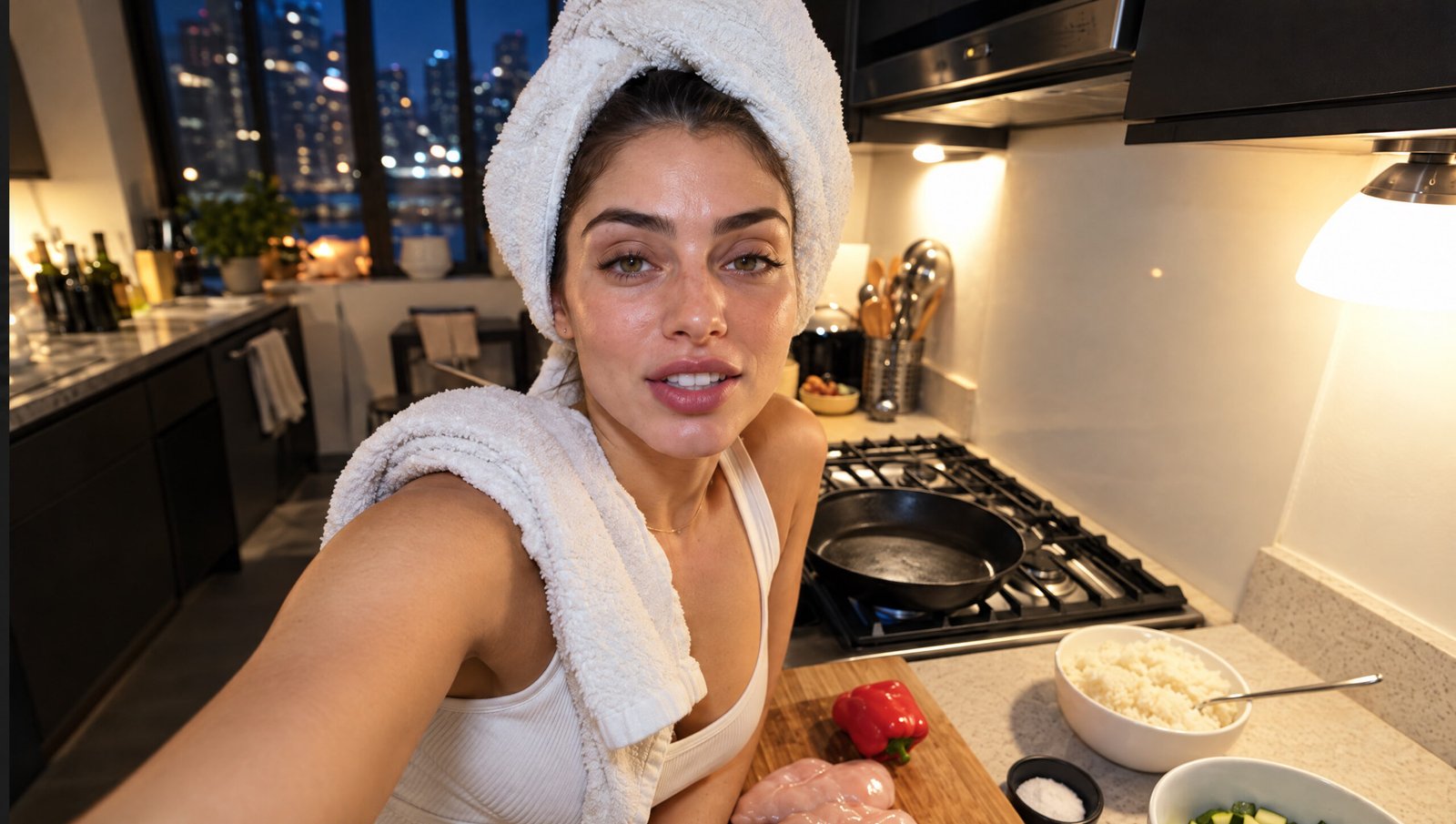
[INSERT IMAGE: Original kitchen vlog character]
[INSERT IMAGE: Character reference sheet]
[INSERT IMAGE: Kitchen scene showing the character slicing vegetables]
This was one of my favorite experiments.
Instead of a cinematic scene or an obvious advertisement, I wanted something that looked like ordinary lifestyle footage.
A person standing in a kitchen, preparing food, with natural lighting and everyday movement.
Simple scenes like this can be surprisingly challenging for AI video because hands, food preparation, objects, and interactions need to remain believable.
Step 1: Generate the Character
I started with a realistic female character image, establishing her recognizable facial features and general appearance.
The character would later appear in a kitchen environment, so it was important to have a clear visual reference before generating movement.
Full Kitchen Character Prompt
Model: GPT Image 2.5
Prompt:
[PASTE YOUR COMPLETE KITCHEN CHARACTER CREATION PROMPT HERE]
Step 2: Create the Character Reference Sheet
I then used GPT Image 2.5 Sunburst to generate additional angles of the same character.
[INSERT IMAGE: Multi-angle kitchen character sheet]
The reference sheet helped establish her face, hair, and appearance across different viewpoints.
For a cooking scene, this matters because the character may look downward at a cutting board, turn toward the camera, or move between different positions.
Full Kitchen Character Sheet Prompt
Model: GPT Image 2.5 Sunburst
Reference: Original character image
Prompt:
[PASTE YOUR COMPLETE KITCHEN CHARACTER SHEET PROMPT HERE]
Step 3: Create the Kitchen Scene
[INSERT IMAGE: Kitchen scene reference, if used separately]
The scene was designed to resemble a casual evening cooking vlog.
The character stands in a realistic kitchen with vegetables, a cutting board, cabinets, and practical interior lighting.
Rather than an overproduced commercial appearance, the visual direction focused on a normal residential environment.
If using a separate kitchen reference, keep the furniture arrangement, lighting, and main objects consistent with the intended video.
Full Kitchen Environment Prompt
Model: GPT Image 2.5
Prompt:
[PASTE KITCHEN ENVIRONMENT GENERATION PROMPT HERE, IF YOU USED A SEPARATE ENVIRONMENT REFERENCE. OTHERWISE REMOVE THIS PROMPT SECTION.]
Step 4: Animate the Cooking Scene With Seedance 2.5
This was the most interesting part of the workflow.
The character needed to interact with objects rather than simply walk or talk.
That meant the prompt had to describe the cooking actions clearly, including hand movement, interaction with the cutting board, and natural body motion.
I used Seedance 2.5 to turn the reference into a moving kitchen scene.
Full Kitchen Vlog Video Prompt
Model: Seedance 2.5
References: Character sheet and any scene references used
Prompt:
[PASTE YOUR COMPLETE KITCHEN VLOG VIDEO PROMPT HERE, INCLUDING ACTION SEQUENCE, HAND AND OBJECT INTERACTIONS, CAMERA BEHAVIOR, LIGHTING, SOUND, AND CHARACTER CONSISTENCY]
Final Result
[EMBED FINAL KITCHEN VLOG VIDEO HERE]
The result was a convincing lifestyle scene with a more natural, everyday appearance than many typical AI video demonstrations.
What impressed me most was the overall feel of the shot, particularly the residential lighting, environmental details, and believable cooking-vlog presentation.
This doesn’t mean every generated action will always be perfect.
Hands, physical interactions, and moving objects are still worth examining carefully, especially in longer generations.
But with stronger references and more specific prompts, even an ordinary kitchen scene can become a useful AI video experiment.
The Most Important Lesson: Build Better References Before Generating Video
After working on these four projects, one thing became increasingly clear.
A detailed video prompt is useful, but strong visual references can make a huge difference.
Here’s how the reference strategy changed across the experiments.
| Project | Main reference strategy |
|---|---|
| Gym vlog | Original character + three-panel sheet |
| Fashion vlog | Character + apartment + garment + label details |
| UGC video | Generated character + six-panel facial sheet |
| Kitchen vlog | Generated character + multi-angle sheet + cooking scene guidance |
For simple videos, one strong character sheet may be enough.
For more complex scenes involving clothing, locations, or product interactions, multiple reference images can help communicate details that are difficult to describe using text alone.
The trick is to keep those references consistent.
If one image shows a different hairstyle, outfit, or facial appearance, the video model may receive conflicting information.
How to Write Better Seedance 2.5 Prompts
For beginners, I recommend thinking about video prompts in six parts.
1. Character
Who appears in the video? Which reference image defines their appearance?
2. Environment
Where does the scene happen? Describe the location, lighting, and atmosphere.
3. Action
What does the character actually do? Be specific about movements and interactions.
4. Camera
Should it look like a handheld smartphone video, a stationary camera, or a cinematic tracking shot?
5. Audio
Describe dialogue, environmental sounds, clothing movement, footsteps, or other relevant audio.
6. Consistency
Explain which visual elements should remain unchanged throughout the scene.
A strong prompt should describe a scene clearly enough that someone reading it could imagine how the finished footage is supposed to look.
Longer isn’t automatically better. Clear, consistent instructions matter more than adding unnecessary technical language.
Bonus: Recreate Trending Video Styles With Higgsfield Genjutsu
[INSERT IMAGE: Genjutsu template gallery]
[INSERT IMAGE: Original character and recreated trending video]
Higgsfield also includes a tool called Genjutsu, which offers another way to experiment with AI video.
Instead of developing every camera movement and visual style from scratch, you can select an existing community style and adapt it using your own character.
Here’s the basic process:
- Open Genjutsu in Higgsfield’s Video section.
- Browse available community styles.
- Choose a suitable template and select Recreate.
- Replace the template’s character reference with your own.
- Review the remaining settings and generate.
This is useful for exploring trending formats and discovering new visual directions.
[EMBED GENJUTSU VIDEO RESULT HERE]
Common Problems When Creating Realistic AI Videos
Even with modern AI models, not every generation will look convincing.
Here are several issues worth watching for.
The Character’s Face Changes
Try generating a multi-angle reference sheet and making the intended character reference explicit in the video prompt.
The Movement Looks Artificial
Describe physical actions more clearly. For realistic lifestyle footage, restrained movements often work better than unnecessarily dramatic actions.
The Camera Looks Too Perfect
If you’re creating a casual vlog, specify natural handheld framing and realistic camera behavior rather than automatically requesting cinematic stabilization.
Clothing Changes Between Shots
Create separate garment references and keep the clothing instructions consistent.
Hands and Object Interactions Look Strange
Pay close attention to scenes involving cooking, product handling, and complicated gestures. Simplifying the action or regenerating with clearer instructions may help.
The Final Video Looks Oversharpened
Avoid automatically applying aggressive upscaling, excessive sharpening, or strong noise reduction. These can damage natural skin textures and make convincing footage appear artificial.
Frequently Asked Questions
Can beginners make realistic AI videos?
Yes. You don’t need animation or video editing experience to follow the workflows in this guide. However, understanding references, prompting, and visual consistency will help you achieve better results.
Which AI tools did you use?
These projects were created using Higgsfield AI, primarily GPT Image 2.5 for reference generation and Seedance 2.5 for video creation.
Why do you create character sheets?
Character sheets give the video model more visual information about the same person, helping guide facial and clothing consistency across different camera angles.
Can Seedance 2.5 create 30-second videos?
The workflows demonstrated here include 30-second Seedance 2.5 generations. Available duration and quality settings may vary depending on the model version and platform.
Do I need multiple reference images?
Not always. A simple video may work with one reference. More detailed projects can benefit from additional references for clothing, environments, or products.
Can AI-generated videos be used commercially?
Commercial use depends on the platform’s terms, the licensing of reference materials, and the rights associated with any brands, music, or recognizable individuals. Review those requirements before publishing or selling AI-generated content.
Final Thoughts
AI video generation is becoming more accessible, but producing convincing results still benefits from planning.
Across these four projects, I explored everything from handheld fitness vlogs and fashion try-on videos to AI UGC and everyday cooking footage.
Each project required a slightly different approach, but the core workflow remained similar:
Create a character, prepare useful references, describe the scene clearly, and generate the video.
For me, the most useful discovery wasn’t simply that Seedance 2.5 could create realistic footage. It was how much more control I could get by preparing the right visual materials beforehand.
Whether you’re experimenting with AI filmmaking, creating social content, developing advertising concepts, or just learning something new, this workflow is a practical place to start.
Watch the full video tutorial: [INSERT YOUTUBE VIDEO LINK]
Try Higgsfield AI: [INSERT YOUR TRACKING LINK]
New users who sign up through my link can get up to 50% off their first purchase on Higgsfield, subject to the current offer.
What would you like to see next? AI short films, product commercials, cinematic storytelling, or more realistic lifestyle videos?
Let us know in the comments.
Published on TheByteLab. This tutorial includes AI-generated demonstrations. Some links may be promotional or affiliate links. [ADD THE FINAL SPONSORSHIP DISCLOSURE APPLICABLE TO THIS ARTICLE.]